
scoryst
@preview🎼 Music engraving: render ABC, MusicXML, MEI, Humdrum, Volpiano, EsAC, PAE, and CMME notations.
Scoryst - Music Engraving Plugin for Typst
A Typst plugin to render music notation from multiple formats using Verovio, compiled to WASM.
Features
- 8 input formats: ABC, MusicXML, MEI, Humdrum, EsAC, PAE, Volpiano, CMME
- Automatic format detection: the input format is inferred from the data
- 5 SMuFL-compliant music fonts: Leipzig (default), Bravura, Gootville, Leland, Petaluma
- Full Verovio options: scale, font, page layout, and all toolkit options
Example
Code in, engraved score out:
#score("X:1\nT:Ode to Joy\nM:4/4\nK:C\nEEFG|GFED|CCDE|E2D2|")
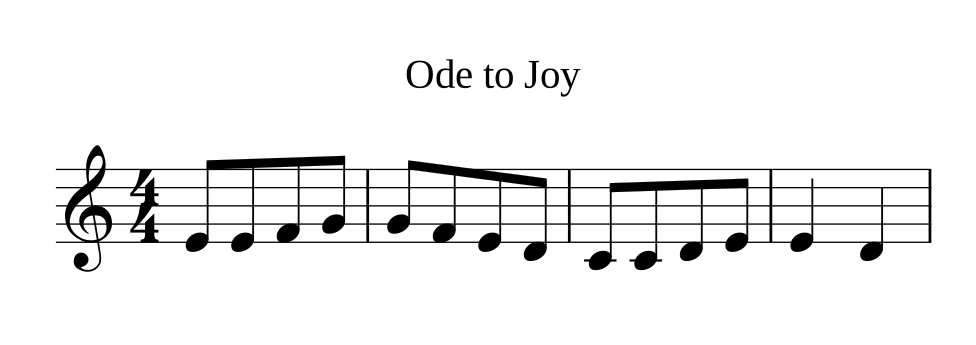
See the documentation for every feature with rendered examples.
Download files for each supported format
ABC
MusicXML
MEI
Humdrum
- https://kern.ccarh.org/
- https://github.com/craigsapp/bach-370-chorales
- https://github.com/craigsapp/mozart-piano-sonatas
EsAC
PAE (Plaine & Easie)
Volpiano
CMME
Usage
All formats are auto-detected; pass options: (input-from: "abc") to enforce a
specific one.
Compact formats can be written inline, verbose ones loaded with
read().
#import "@preview/scoryst:0.2.0": score, pages, convert, music-blocks

// ABC notation
#score("X:1\nM:4/4\nK:C\nCDEF|GABc|")

// MEI
#score(read("schubert.mei"))

// MusicXML
#let data = read("adagio.xml")
#score(data)

// Change font
#score(data, options: (font: "Petaluma"))

// Multi-page
#let n = pages(data)
#for p in range(1, n + 1) {
  score(data, page: p)
}

// Transcode to another format (input is auto-detected)
#let mei = convert("X:1\nK:C\nCDEF|", to: "mei")
#let pae = convert(read("adagio.xml"), to: "pae")
Once music-blocks is enabled, fenced blocks render directly as a score:
#show: music-blocks

```abc
X:1
K:C
CDEF|GABc|
```
API
score(data, options: none, page: 1, ..args)
Renders music notation to an SVG image. data is a string in any supported
format. ..args are forwarded to Typst's image() function (width,
height, fit, alt).
pages(data, options: none)
Returns the number of pages for the given music data.
convert(data, to: "mei", options: none)
Transcodes music notation to another format. The input format is auto-detected;
to is "mei" (canonical MEI) or "pae" (Plaine & Easie). Returns a string.
available-options()
Returns Verovio's full option catalogue as a nested dictionary (grouped by
category, each option carrying its title, description, type, and
default).
version()
Returns the bundled Verovio version string (e.g. "6.3.0").
music-blocks(options: none, body) (show rule)
Renders any fenced code block tagged with a notation format as its language
directly as a score. Enable it once with #show: scoryst.music-blocks (or, with
default options, #show: scoryst.music-blocks.with(options: (font: "Bravura"))).
The language tag selects the block and sets the format:
| Code fence | Format |
|---|---|
```abc |
ABC |
```musicxml |
MusicXML |
```mei |
MEI |
```humdrum or ```kern |
Humdrum |
```esac |
EsAC |
```pae |
Plaine & Easie |
```volpiano |
Volpiano |
```cmme |
CMME |
Blocks in any other language are left untouched.
Verovio Options
Options are passed as a Typst dictionary and map directly to Verovio's toolkit options.
Both kebab-case and camelCase keys are accepted (e.g. adjust-page-height or adjustPageHeight).
For more info, check the documentation.