
tidymind
Mind maps for Typst, built on CeTZ, that lay themselves out. You write the tree; tidymind measures every label and places each branch so nothing overlaps.
Why tidymind
- No overlap at any depth. Every node is measured before the layout runs, so a label that wraps gets the room it needs.
- Five styles:
boxed,outline,technical,barandblock. - Three edges: curved, straight, or tapered ribbons that thin toward the leaves.
- One side or two: grow the map to the right, to the left, or both ways, balanced by size.
- Roles by name: mark a node as a warning, a definition or an example, and get a tag or a color.
- Labels that read like labels: any Typst content, never hyphenated or justified by the surrounding document.
What's new in 0.3.0
- Three new styles:
technical,barandblock. edge: "straight"andedge: "tapered", besides the curved edge.direction: "left"anddirection: "both";align-levelslines up each depth in one column.surfaceturns nodes into tinted cards;markers: "role"tags a node's role instead of recoloring it.- Four levels with their own look (root, branch, point, detail).
- A new default palette, "Slate": six muted colors that read well on white.
- A label ignores the document's justification and hyphenation: inside a justified, hyphenated document it used to split words and open gaps.
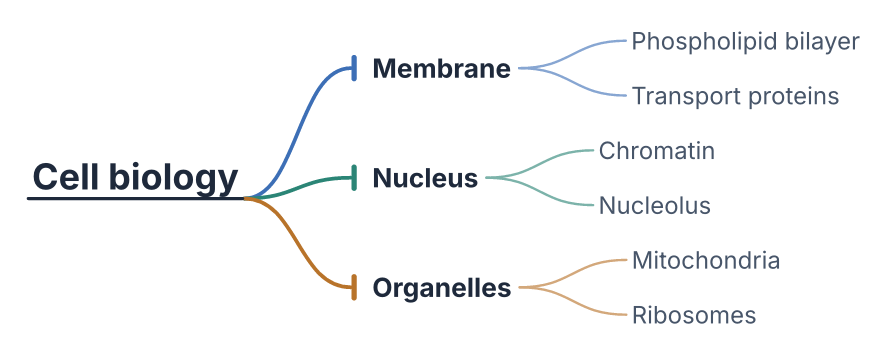
Usage
#import "@preview/tidymind:0.3.0": mindmap, node

#mindmap(node([Root],
  node([Branch A], node([A1]), node([A2])),
  node([Branch B]),
))
node(content, ..children) builds a tree node; content is the label and the
remaining positional arguments are its children (each one another node(...) or
raw content). A raw dictionary (content: .., children: (..)) is also accepted.
Long labels
This is the case that pushed the package into existence. Node sizes come from
Typst's measure, so a label that wraps reserves the vertical band it actually
needs, at any depth, with no manual offsets.

Styles
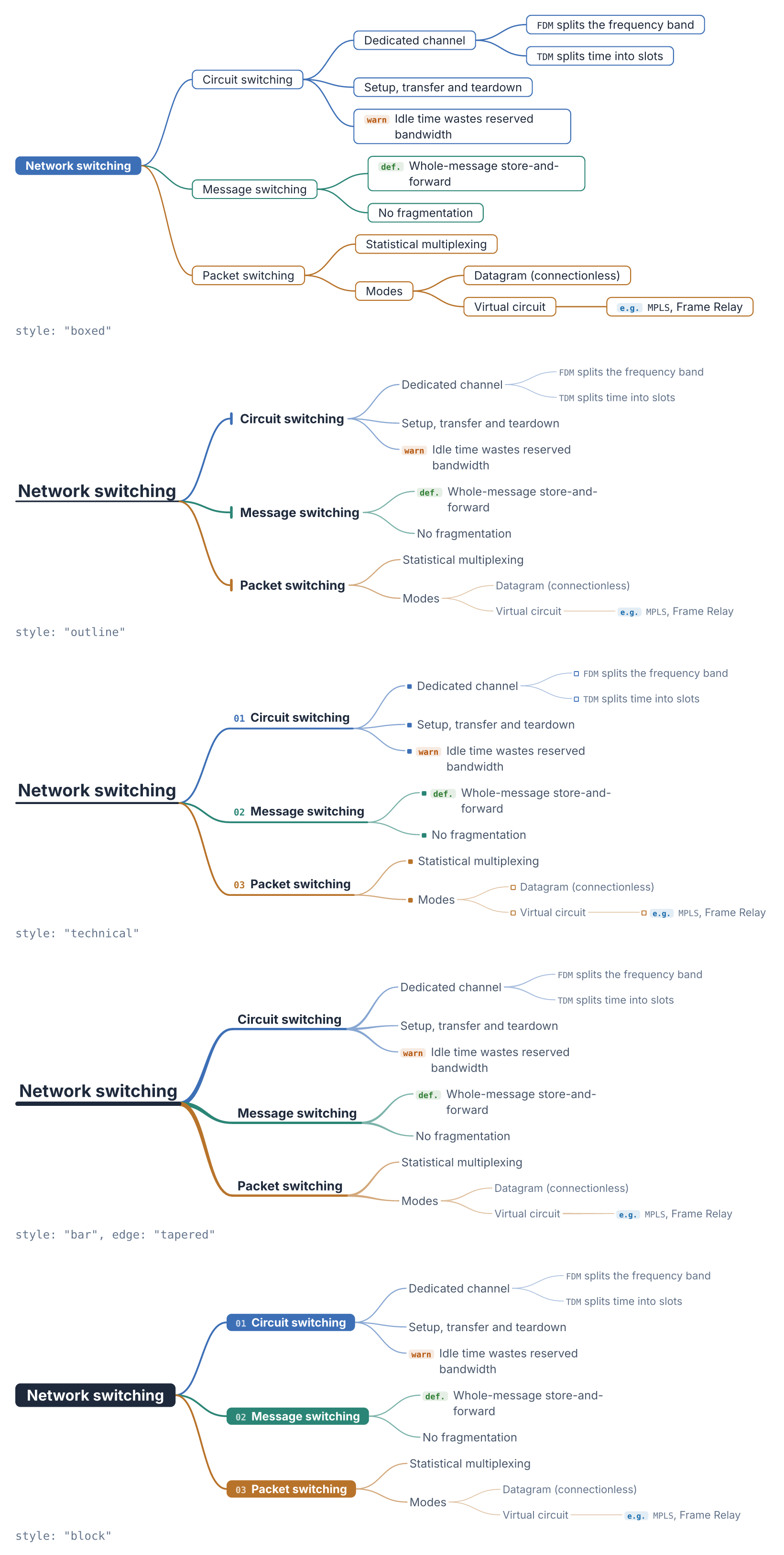
style: "boxed" (the default) draws every node as a rounded box, the root
filled with its branch color.
style: "outline" drops the boxes entirely: the root becomes a heading over a
baseline rule, each first-level branch a label beside a rounded capsule in its
own color, and everything deeper is plain text. Hierarchy comes from size, weight
and color instead of from frames, which helps when the map sits inside a document
and boxes would fight with the surrounding text.
Technical, bar and block
Three more styles build on the same tree. The examples below all draw this one:
#let switching = node([Network switching],
  node([Circuit switching],
    node([Dedicated channel],
      node([`FDM` splits the frequency band]),
      node([`TDM` splits time into slots]),
    ),
    node([Setup, transfer and teardown]),
    node([Idle time wastes reserved bandwidth], emphasis: "warning"),
  ),
  node([Message switching],
    node([Whole-message store-and-forward], emphasis: "definition"),
    node([No fragmentation]),
  ),
  node([Packet switching],
    node([Statistical multiplexing]),
    node([Modes],
      node([Datagram (connectionless)]),
      node([Virtual circuit], node([`MPLS`, Frame Relay], emphasis: "example")),
    ),
  ),
)
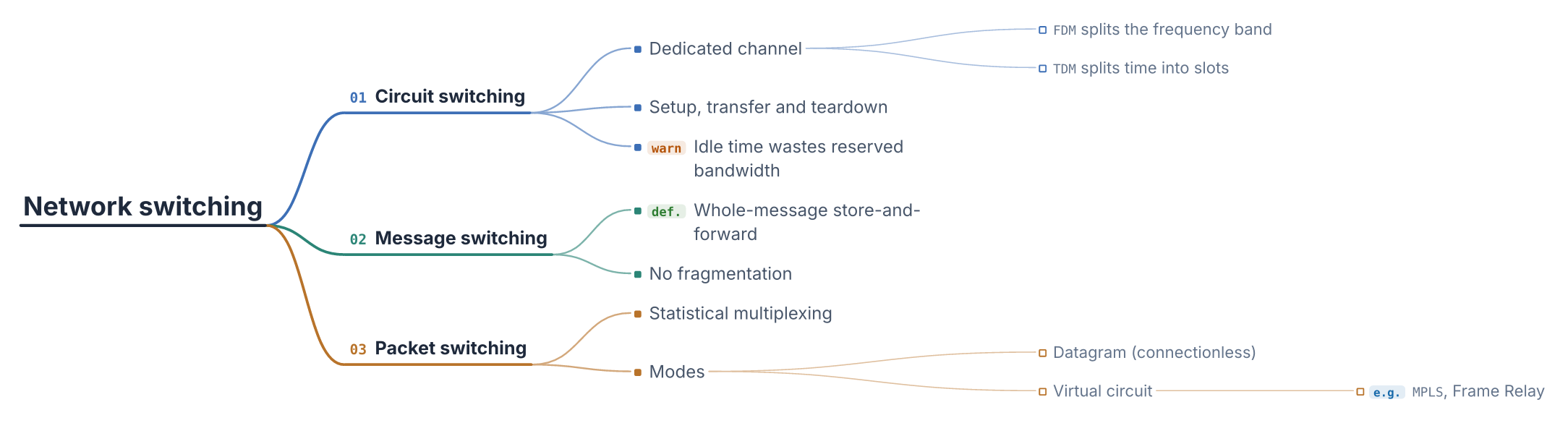
style: "technical" reads like a spec sheet: the root and each first-level
branch sit on a rule that the edge runs into, branches are numbered, and points
get a small square marker. Here with role tags and align-levels:
#mindmap(switching, style: "technical", markers: "role", align-levels: true)
style: "bar" draws the root and the branches over rules, and pairs with
the tapered edge, which runs from the root's rule into each branch's and thins
toward the leaves.
#mindmap(switching, style: "bar", edge: "tapered", markers: "role")
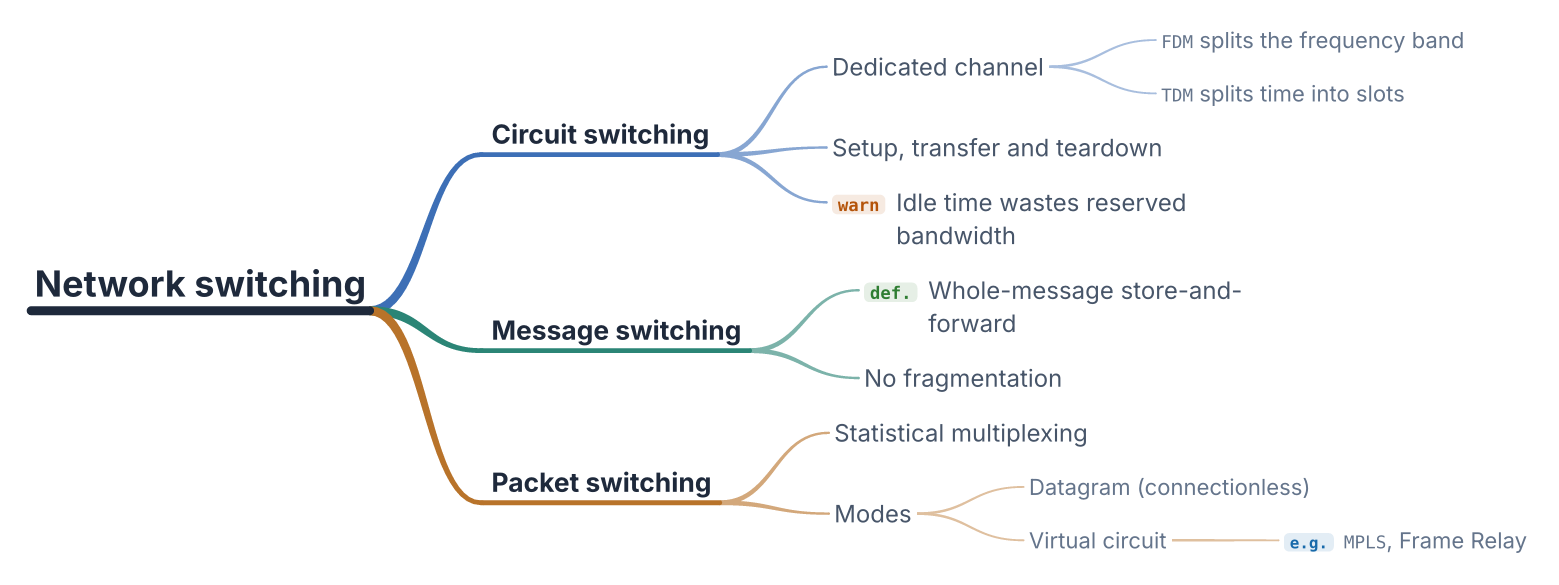
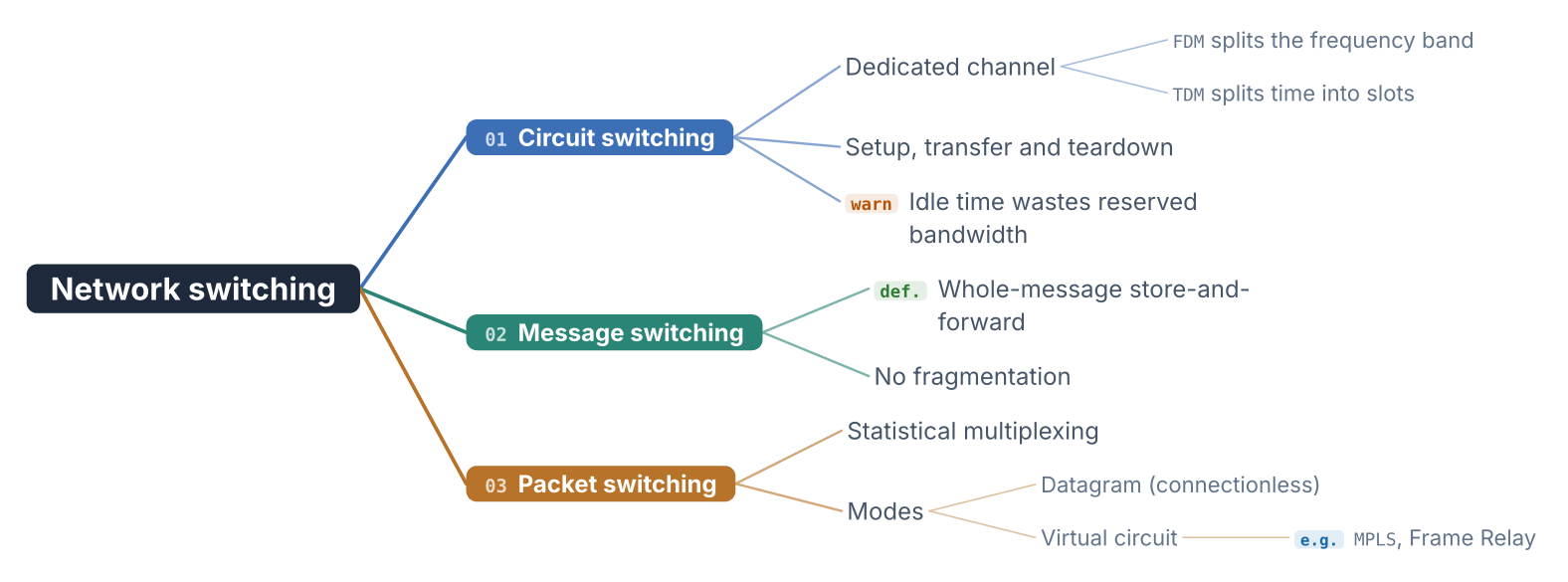
style: "block" fills the root and the first-level branches, numbered, and
leaves everything deeper as plain text.
#mindmap(switching, style: "block", edge: "straight", markers: "role")
Edges
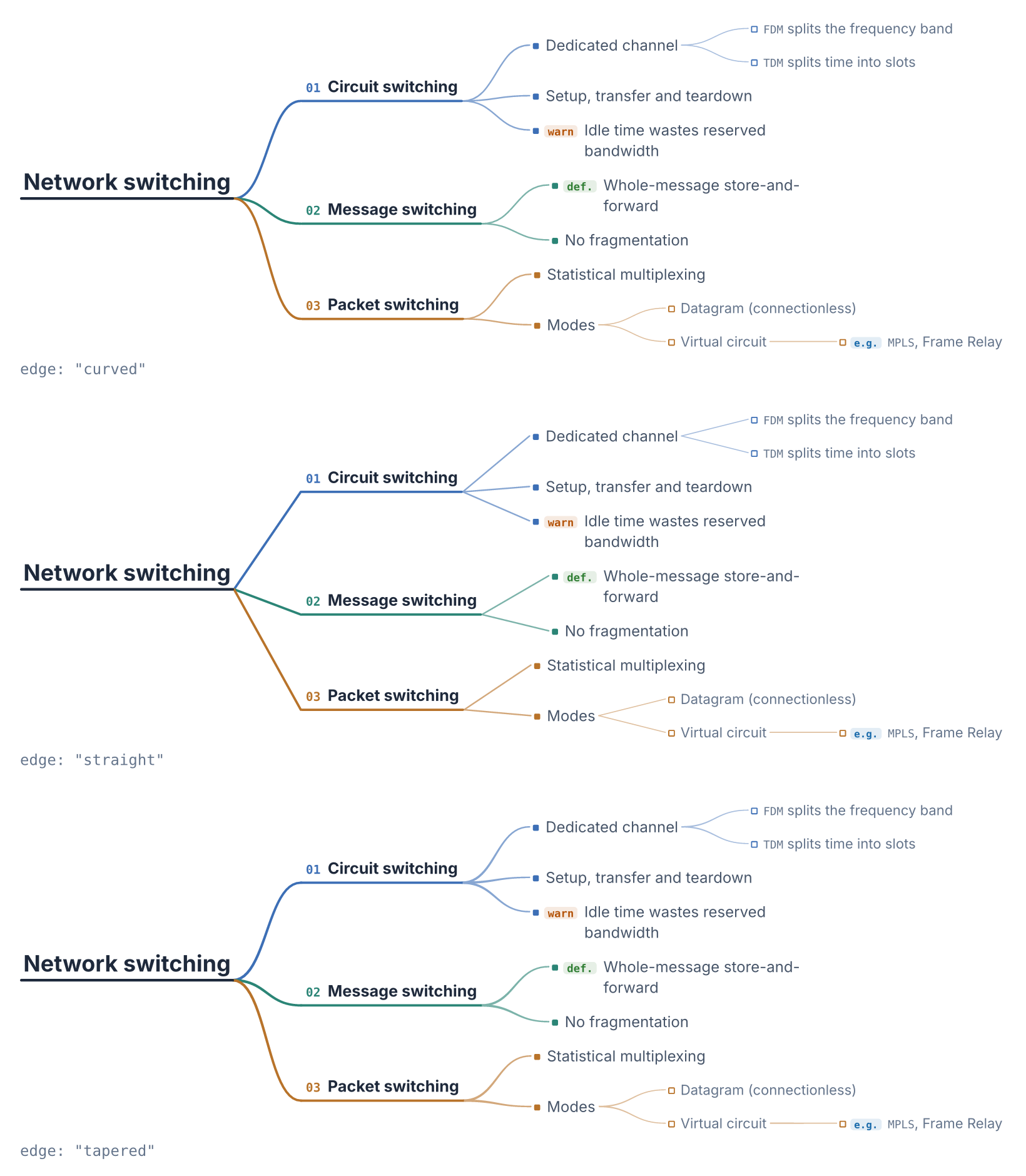
edge picks how a parent reaches its children: "curved" (the default),
"straight", or "tapered", a filled ribbon that thins from the parent to the
child. Any edge goes with any style. Below the first level, edges are drawn
lighter in every style but "boxed".
#mindmap(switching, style: "technical", edge: "curved", markers: "role")
#mindmap(switching, style: "technical", edge: "straight", markers: "role")
#mindmap(switching, style: "technical", edge: "tapered", markers: "role")
Direction and columns
direction: "left" grows the map to the left; direction: "both" sends the
first branches to the right and the rest to the left, split so both sides carry
about the same height. A label on the left side is right-aligned, so it ends
where its edge arrives. align-levels: true starts every depth at one column
per side instead of right after its parent (see the technical example above).
#mindmap(switching, style: "technical", direction: "both", markers: "role")

Surface
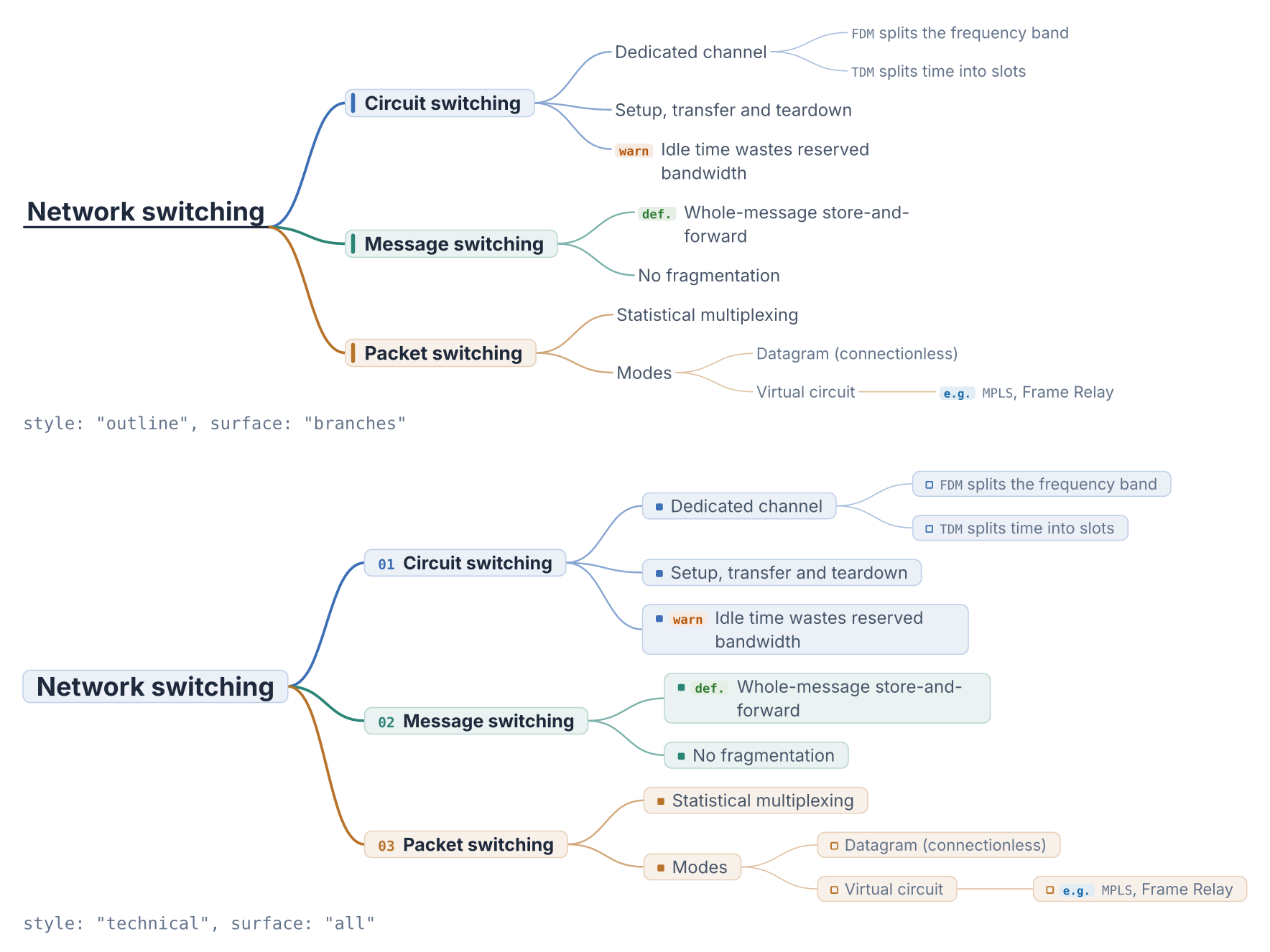
surface: "branches" puts the first-level branches on tinted cards in their
color; surface: "all" does the same for every node.
#mindmap(switching, style: "outline", surface: "branches", markers: "role")
#mindmap(switching, style: "technical", surface: "all", markers: "role")
Role markers
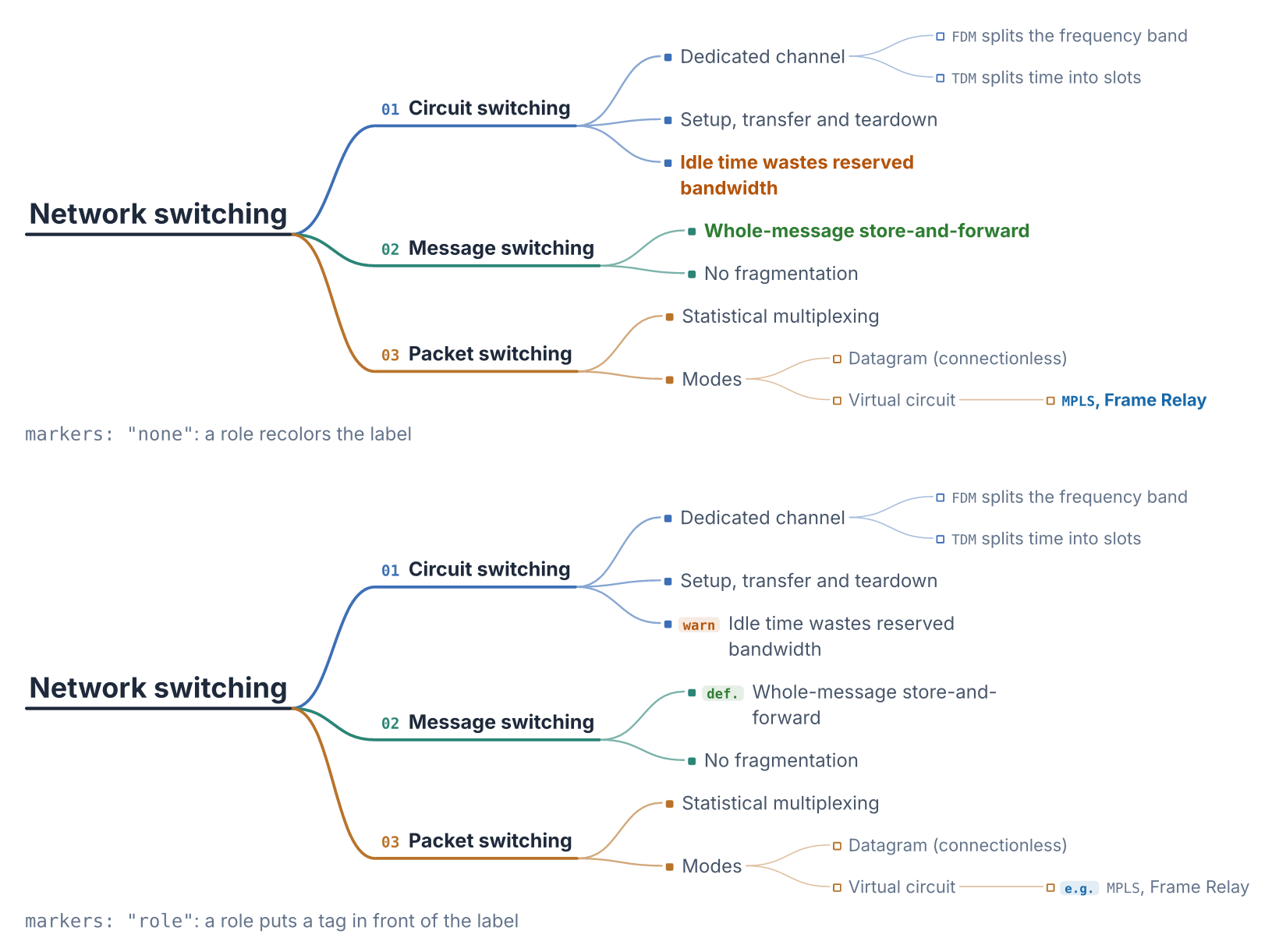
By default a node's emphasis recolors its label (see "Roles and branch
colors" below). markers: "role" keeps the label in the normal ink and puts a
short tag in front of it instead, in mono-font. emphasis-labels changes the
tag text, e.g. emphasis-labels: (warning: "watch out"); a partial dictionary
merges over the defaults (key, warn, def., e.g.).
#mindmap(switching, style: "technical")
#mindmap(switching, style: "technical", markers: "role")
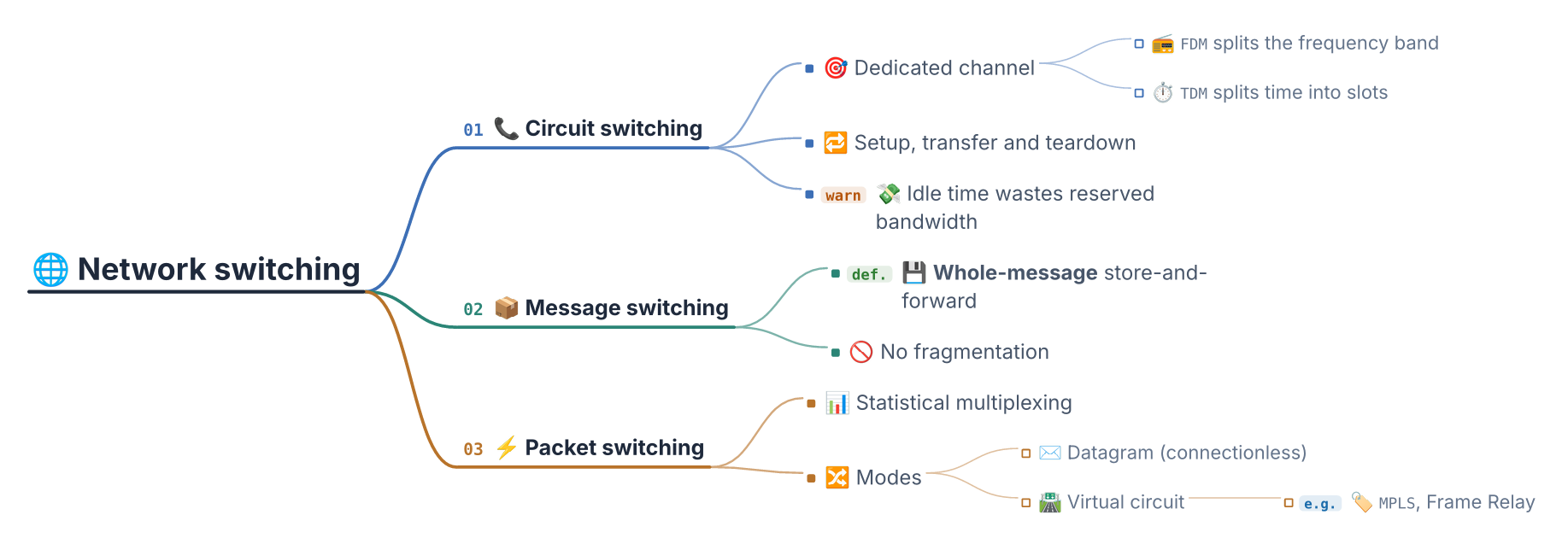
Markup and emoji
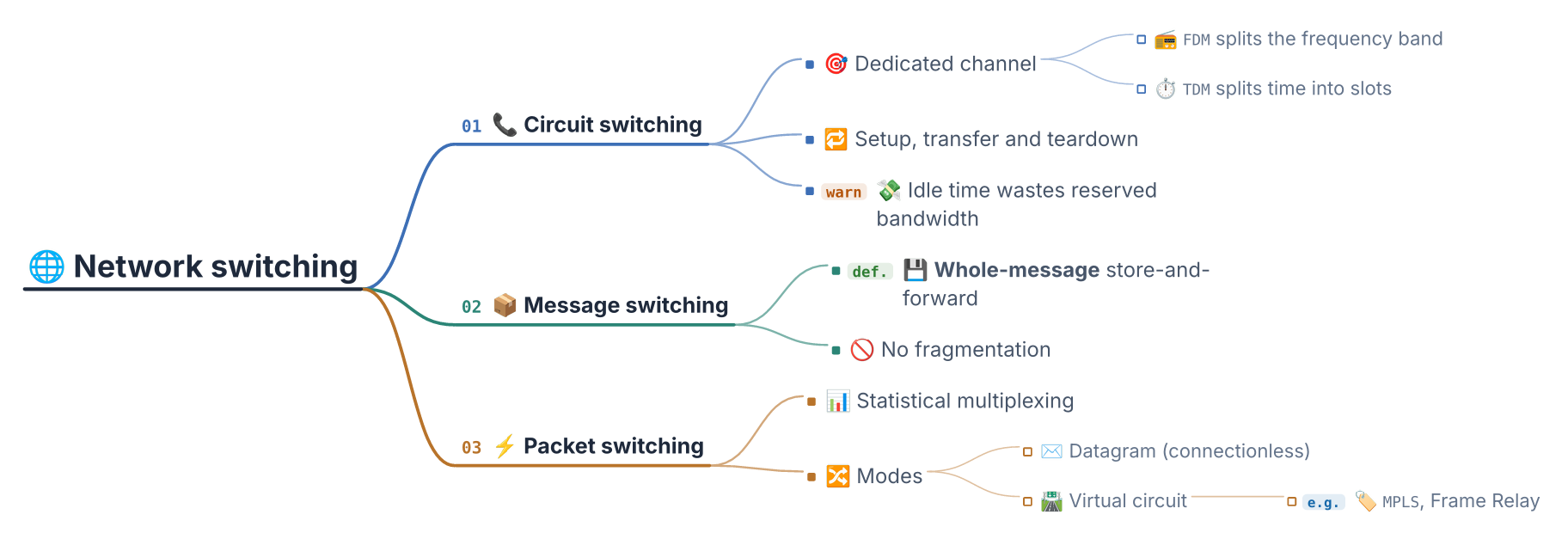
Labels take any Typst content: *strong*, `raw`, math, links. Emoji work
too, as long as a color emoji font is in the font fallback list. This is the
map at the top of the page:
#let switching = node([🌐 Network switching],
  node([📞 Circuit switching],
    node([🎯 Dedicated channel],
      node([📻 `FDM` splits the frequency band]),
      node([⏱️ `TDM` splits time into slots]),
    ),
    node([🔁 Setup, transfer and teardown]),
    node([💸 Idle time wastes reserved bandwidth], emphasis: "warning"),
  ),
  node([📦 Message switching],
    node([💾 *Whole-message* store-and-forward], emphasis: "definition"),
    node([🚫 No fragmentation]),
  ),
  node([⚡ Packet switching],
    node([📊 Statistical multiplexing]),
    node([🔀 Modes],
      node([✉️ Datagram (connectionless)]),
      node([🛣️ Virtual circuit], node([🏷️ `MPLS`, Frame Relay], emphasis: "example")),
    ),
  ),
)

#mindmap(switching, style: "technical", markers: "role",
  font: ("Inter", "Noto Color Emoji"))
Labels inside justified text
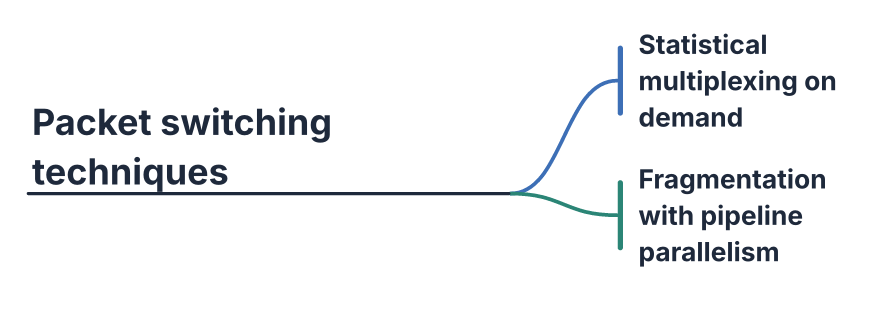
A label ignores the document's justification (par(justify: true)) and
hyphenation: a wrapped label breaks between words and keeps its normal
spacing.
#set text(lang: "en", hyphenate: true)
#set par(justify: true)
#let long = node([Packet switching techniques],
  node([Statistical multiplexing on demand]),
  node([Fragmentation with pipeline parallelism]),
)
#mindmap(long, style: "outline", node-max-width: 3.2cm)
Roles and branch colors
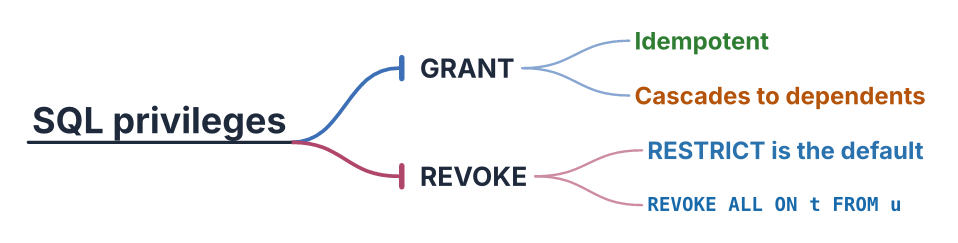
A node can carry an emphasis (its role) and a branch index that overrides
the color it would inherit from its position. The override covers the node's
whole subtree (edges, rules, numbers, markers, cards), unless a descendant sets
its own branch. The root belongs to no branch, so a branch on the root changes
nothing. Both are given by name: the document says what a node
means, and the package resolves the color.
#mindmap(
  node([SQL privileges],
    node([GRANT],
      node([Idempotent], emphasis: "definition"),
      node([Cascades to dependents], emphasis: "warning"),
    ),
    node([REVOKE], branch: 5,
      node([RESTRICT is the default], emphasis: "highlight"),
      node([`REVOKE ALL ON t FROM u`], emphasis: "example"),
    ),
  ),
  style: "outline",
)
Palette
palette gives one color per first-level branch, cycled. The default,
"Slate", is six muted colors, each with at least 3.8:1 contrast on white, so a
branch color holds up as a thin rule and as text:
#3d6fb6 blue, #2b8576 teal, #b8732a amber, #7d5aa6 violet,
#b0466a rose, #5a7a2c olive.
#mindmap(switching, palette: (rgb("#1f4e79"), rgb("#1d6b5f"), rgb("#94570f")))
Options
| Option | Default | Meaning | Since |
|---|---|---|---|
style |
"boxed" |
"boxed", "outline", "technical", "bar" or "block" |
0.2 |
palette |
6 colors | color per first-level branch, cycled; "Slate" by default (see Palette) | 0.1 |
font |
"Inter" |
label font, or a fallback list | 0.1 |
text-size |
9pt |
base label size; the root and first level scale up from it | 0.1 |
node-max-width |
6cm |
max width before a label wraps | 0.1 |
root-max-width |
auto |
the root's wrap width; auto is twice node-max-width |
0.3 |
max-depth |
6 |
prune nodes deeper than this | 0.1 |
h-gap |
40pt |
horizontal gap between levels | 0.1 |
v-gap |
10pt |
minimum vertical gap between siblings | 0.1 |
ink |
(strong, soft, faint) |
label colors (faint, for depth 3 and deeper, since 0.3); partial dictionaries merge over the defaults |
0.2 |
emphasis-colors |
4 roles | highlight, warning, definition, example |
0.2 |
edge |
"curved" |
"curved", "straight" or "tapered" |
0.3 |
direction |
"right" |
"right", "left" or "both" |
0.3 |
align-levels |
false |
each depth starts at one column per side | 0.3 |
surface |
"none" |
"none", "branches" or "all" |
0.3 |
markers |
"none" |
"none" or "role" |
0.3 |
emphasis-labels |
4 roles | tag text per role, merged over the defaults | 0.3 |
mono-font |
"DejaVu Sans Mono" |
font of branch numbers and role tags | 0.3 |
How it works
The layout is a tidy tree by subtree extent: every subtree reserves a vertical band equal to the sum of its children's bands (or its own height, if a leaf), and the parent is centered within that band. Because sibling subtrees occupy disjoint bands, nodes never overlap, at any depth. It runs in O(n), in two passes: one up the tree to size the bands, one down to place the nodes.
Node sizes come from Typst's measure, so a band accounts for the real rendered
size of each (possibly wrapped) label. Measuring and drawing go through a single
description of the node body (src/style.typ), which is what keeps an edge
landing exactly on the node it points at.
Examples
Every file under examples/ compiles on its own. Files named
visual_* produce the images above; files named _assert_* exercise the logic
through #assert, so compiling them is the test suite.
FONT_PATH=/path/to/fonts sh examples/render.sh # runs the asserts, then regenerates img/
FONT_PATH must hold Inter and Noto Color Emoji (DejaVu Sans Mono, the default
mono-font, ships inside Typst), unless they are installed system-wide. A
missing font makes Typst warn, and any warning fails the run.
| Example | What it covers |
|---|---|
visual_shallow |
a root with three leaves |
visual_deep |
several levels of nesting |
visual_many_siblings |
vertical spacing under pressure |
visual_long_labels |
labels wrapping at node-max-width |
visual_outline |
the "outline" style |
visual_emphasis |
roles and branch overrides |
visual_markdown_emoji |
markup and emoji in labels, with the font fallback list |
visual_single |
a lone root |
visual_empty |
empty labels |
visual_hero |
the map at the top of this page |
visual_gallery |
the five styles on one map |
visual_edges |
the three edges on one map |
visual_technical |
the "technical" style, role tags, align-levels |
visual_bar |
the "bar" style with the tapered edge |
visual_block |
the "block" style with straight edges |
visual_both |
direction: "both" |
visual_surface |
surface: "branches" and surface: "all" |
visual_markers |
markers: "none" against markers: "role" |
visual_justified |
labels inside a justified, hyphenated document |
Changelog
0.3.0 — adds the technical, bar and block styles, edge, direction,
align-levels, surface, markers, emphasis-labels, mono-font and
root-max-width, and a fourth level of styling. Output changes: a label no
longer inherits the document's justification and hyphenation (a label inside a
justified document stops splitting words), and in "outline" the first-level
rule becomes a rounded capsule and the edges below the first level are drawn
lighter. The default palette changed from the saturated 0.1/0.2 colors to
"Slate", a muted set with at least 3.8:1 contrast on white; pass
palette: (rgb("#2563eb"), rgb("#16a34a"), rgb("#dc2626"), rgb("#9333ea"), rgb("#ea580c"), rgb("#0891b2"))
to keep the old look. Also in "outline", the root's edges leave from its rule, labels at
depth 3 and deeper are 92% size in the faint ink, edges at depth 2 and deeper
land on the label's first line, and the branch inset grew to 8pt. A label on
the left side (direction: "left" or "both") is right-aligned, so a wrapped
label ends where its edge arrives, and a label no longer inherits the
document's alignment. A root longer than node-max-width now wraps at up to twice that
width (root-max-width: auto); pass root-max-width equal to node-max-width
(e.g. 6cm) for the old layout. Nodes now sit exactly at their layout position
(a sub-point shift) and edges have round caps. An explicit branch now
colors the node's whole subtree, not just the node (its children used to fall
back to their position's color). Apart from the palette,
style: "boxed" renders what 0.2.0 rendered.
0.2.0 — adds style: "outline", the branch and emphasis attributes on
node, and the ink / emphasis-colors options. The default output is
unchanged: style: "boxed" renders exactly what 0.1.1 rendered.
0.1.1 — long labels wrap instead of overflowing their measured width.
Sponsor

tidymind is developed with support from Elitus (@souelitus on Instagram).
License
MIT